👁️
AI Branches • Intermediate⏱️ 35 min read
Computer Vision Basics — Teaching Machines to See
How Do Machines See? 👀
You glance at a photo and instantly recognise a dog, a car, or your best friend's face. Your brain does this effortlessly — but for a computer, "seeing" is an incredibly complex task.
Computer vision is the field of AI that gives machines the ability to interpret and understand visual information from the world — images, videos, and live camera feeds.
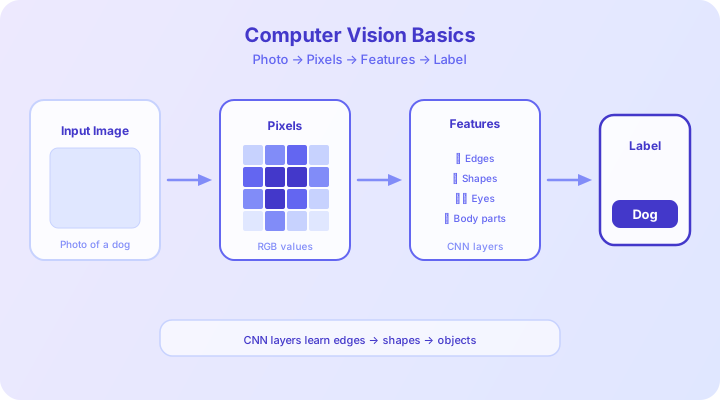
From Pixels to Features 🔍
To a computer, an image is just a grid of numbers.
What a Pixel Is
- A grayscale image is a 2D grid where each cell holds a value from 0 (black) to 255 (white)
- A colour image has three layers (channels): Red, Green, and Blue — stacked on top of each other
- A typical smartphone photo (12 MP) contains 12 million pixels — that's 36 million numbers for a colour image!
# Loading an image and viewing its pixel values
from PIL import Image
import numpy as np

img = Image.open("dog.jpg")
pixels = np.array(img)

print(f"Image shape: {pixels.shape}")
# Output example: (480, 640, 3) → 480 rows, 640 columns, 3 colour channels

print(f"Total pixel values: {pixels.size:,}")
# Output example: 921,600

# A single pixel in the top-left corner
print(f"Top-left pixel (R, G, B): {pixels[0, 0]}")
# Output example: [142, 178, 225] — a light blue sky pixel
From Pixels to Features
Raw pixel values are meaningless on their own. The AI needs to detect features — meaningful patterns:
- Low-level features: edges, corners, colour gradients
- Mid-level features: textures, shapes, parts (eyes, wheels, windows)
- High-level features: entire objects (face, car, building)
Think of it like reading: first you learn letters (low-level), then words (mid-level), then sentences and meaning (high-level).
🤯
The human visual cortex processes images in layers too! Neurons near your eyes detect simple edges and colours, while deeper brain regions recognise complex objects and faces. CNNs were literally inspired by this biological architecture.
Convolutional Neural Networks (CNNs) 🧠
The Convolutional Neural Network is the workhorse of computer vision. Let's build an intuition for how it works — no heavy maths required.
The Key Idea: Sliding Filters
Imagine placing a small magnifying glass (say, 3×3 pixels) on an image and sliding it across every position. At each position, the filter looks for a specific pattern — a vertical edge, a horizontal line, a curve.
Each filter produces a new image called a feature map that highlights where that pattern was found.
CNN Layers (Visual Intuition)
| Layer | What It Does | Analogy | |-------|-------------|---------| | Convolutional | Slides filters across the image to detect features | A detective examining every inch of a crime scene with a magnifying glass | | Activation (ReLU) | Keeps only the strong signals, removes noise | Highlighting key evidence and ignoring distractions | | Pooling | Shrinks the feature maps while keeping important info | Summarising a chapter into bullet points | | Fully Connected | Combines all features to make a final decision | The jury deliberates and reaches a verdict |
# Building a simple CNN with TensorFlow/Keras
from tensorflow.keras.models import Sequential
from tensorflow.keras.layers import Conv2D, MaxPooling2D, Flatten, Dense

model = Sequential([
    # First convolutional layer: 32 filters, 3x3 each
    Conv2D(32, (3, 3), activation='relu', input_shape=(64, 64, 3)),
    MaxPooling2D(pool_size=(2, 2)),

    # Second convolutional layer: 64 filters
    Conv2D(64, (3, 3), activation='relu'),
    MaxPooling2D(pool_size=(2, 2)),

    # Flatten and classify
    Flatten(),
    Dense(128, activation='relu'),
    Dense(10, activation='softmax'),  # 10 classes
])

model.summary()
💡
You don't need to design filters by hand! During training, the CNN learns what filters are most useful. Early layers might learn to detect edges, while deeper layers learn to detect ears, eyes, or entire faces — all automatically from data.
The Three Tasks of Computer Vision 🎯
1. Image Classification
Question: "What is in this image?"
The model assigns a single label to the entire image: "cat", "car", "pizza".
This is what you learned about in AI Sprouts — give the model an image, get a label back.
2. Object Detection
Question: "What objects are here, and where are they?"
The model draws bounding boxes around each object and labels them. This is what self-driving cars use to locate pedestrians, traffic signs, and other vehicles.
3. Image Segmentation
Question: "Which exact pixels belong to each object?"
The model colours every pixel with its object class. This gives pixel-perfect outlines — critical for medical imaging (tumour boundaries) and AR filters (separating your face from the background).
# Using a pre-trained object detection model
# This uses YOLO (You Only Look Once) — one of the fastest detectors

# Pseudocode for clarity
def detect_objects(image_path):
    """Detect and label objects in an image."""
    model = load_pretrained_model("yolov8")
    image = load_image(image_path)

    results = model.predict(image)

    for detection in results:
        print(f"Object: {detection.label}")
        print(f"  Confidence: {detection.confidence:.1%}")
        print(f"  Location: {detection.bounding_box}")
        print()

# Example output:
# Object: person
#   Confidence: 97.2%
#   Location: (120, 50, 340, 480)
# Object: bicycle
#   Confidence: 89.5%
#   Location: (200, 300, 450, 520)
🤔
Think about it:
Self-driving cars need to detect objects in real-time — processing around 30 frames per second. That means the AI has roughly 33 milliseconds to analyse each frame. How do you think engineers balance accuracy with speed? What happens if the model is 99.9% accurate but processes 1 million frames per day?
Real-World Applications 🌍
🚗 Self-Driving Cars
- Multiple cameras feed images into CV models simultaneously
- The AI detects lanes, traffic signs, pedestrians, and other vehicles
- Combines computer vision with LiDAR (laser sensing) and radar for 360° awareness
- Companies: Waymo, Tesla, Cruise
🧑 Facial Recognition
- Maps unique facial features (distance between eyes, jaw shape, nose bridge)
- Used for phone unlocking (Face ID), airport security, and photo organisation
- Controversy: surveillance concerns, racial bias in accuracy, consent issues
📱 AR Filters (Snapchat / Instagram)
- Detects facial landmarks in real-time (68+ points on your face)
- Tracks your face as it moves and overlays digital content
- Uses lightweight models optimised to run on mobile processors
🏭 Manufacturing Quality Control
- Cameras on assembly lines detect defective products
- Spots scratches, dents, or misalignments faster than human inspectors
- Runs 24/7 without fatigue
🤯
The YOLO (You Only Look Once) object detection model can process over 45 images per second on a modern GPU. Its creator, Joseph Redmon, eventually stopped his research over ethical concerns about how the technology might be used for surveillance and military applications.
Hands-On: Understanding a Pre-Trained Model's Predictions 🔬
You don't need to train a model from scratch to experiment with computer vision. Pre-trained models like ResNet, MobileNet, or EfficientNet have already learned from millions of images.
# Using a pre-trained model to classify an image
from tensorflow.keras.applications import MobileNetV2
from tensorflow.keras.applications.mobilenet_v2 import (
    preprocess_input, decode_predictions
)
from tensorflow.keras.preprocessing import image
import numpy as np

# Load pre-trained MobileNetV2 (trained on ImageNet — 1000 classes)
model = MobileNetV2(weights='imagenet')

# Load and preprocess an image
img = image.load_img("photo.jpg", target_size=(224, 224))
img_array = preprocess_input(
    np.expand_dims(image.img_to_array(img), axis=0)
)

# Get predictions
predictions = model.predict(img_array)
top_3 = decode_predictions(predictions, top=3)[0]

print("Top 3 Predictions:")
for rank, (id, label, confidence) in enumerate(top_3, 1):
    bar = "█" * int(confidence * 40)
    print(f"  {rank}. {label}: {confidence:.1%} {bar}")

# Example output:
#   1. golden_retriever: 92.3% █████████████████████████████████████
#   2. Labrador_retriever: 4.1% ██
#   3. cocker_spaniel: 1.8% █
What to Explore
- Try different images — how does the model handle unusual angles or lighting?
- Test edge cases — what happens with blurry images, drawings, or optical illusions?
- Check confidence — does high confidence always mean the prediction is correct?
- Look for biases — does the model work equally well on diverse subjects?
💡
MobileNetV2 is specifically designed to run on mobile phones. It has only 3.4 million parameters — compared to ResNet-152's 60 million — while maintaining impressive accuracy. This is achieved through "depthwise separable convolutions," a clever architectural trick that reduces computation.
The Ethics of Computer Vision ⚖️
With great power comes great responsibility:
- Surveillance: Facial recognition enables mass surveillance without consent
- Bias: Studies show many CV systems are less accurate for women and people of colour
- Deepfakes: AI can generate fake but realistic images and videos of real people
- Privacy: Cameras are everywhere — street CCTV, doorbells, drones — and AI makes it easy to identify individuals at scale
The technology itself is neutral — it's how we choose to deploy it that matters.
Quick Recap 🎯
- Computers see images as grids of numbers — pixels with Red, Green, and Blue values
- CNNs use sliding filters to automatically detect features from edges to objects
- The three core tasks are classification (what?), detection (what and where?), and segmentation (pixel-level labels)
- Real applications include self-driving cars, facial recognition, AR filters, and quality control
- Pre-trained models like MobileNetV2 let you experiment without training from scratch
- Ethics — bias, surveillance, deepfakes, and privacy — must guide how we deploy computer vision
What's Next? 🚀
You've now explored three powerful branches of AI: healthcare applications, natural language processing, and computer vision. These are the foundations that real AI engineers build on every day. In upcoming lessons, we'll dive into AI in creative arts — how machines generate music, art, and stories!
Lesson 3 of 30 of 3 completed